Steht doch im Datenblatt:

25.9 Special ICPORT Features (44-Pin TQFP Package Only)
Under specific circumstances, the No Connect (NC) pins of devices in
44-pin TQFP packages can provide additional functionality. These
features are controlled by device Configuration bits and are available
only in this package type and pin count.

25.9.1 DEDICATED ICD/ICSP PORT
The 44-pin TQFP devices can use NC pins to provide an alternate port for
In-Circuit Debugging (ICD) and In-Circuit Serial Programming (ICSP).
These pins are collectively known as the dedicated ICSP/ICD port, since
they are not shared with any other function of the device.
When implemented, the dedicated port activates three NC pins to provide
an alternate device Reset, data and clock ports. None of these ports
overlap with standard I/O pins, making the I/O pins available to the
user’s application.
The dedicated ICSP/ICD port is enabled by setting the ICPRT
Configuration bit. The port functions the same way as the legacy
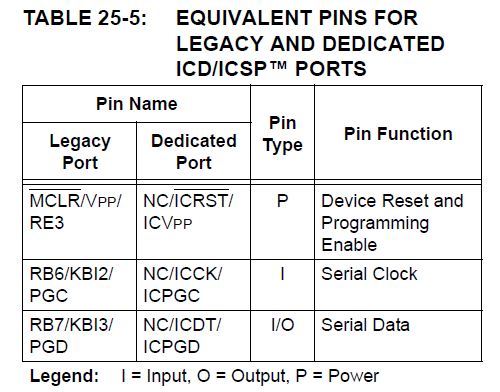
ICSP/ICD port on RB6/RB7. Table 25-5 identifies the functionally
equivalent pins for ICSP and ICD purposes.

TABLE 25-5:


Der 'dedicated ICSP/ICD port' ist einfach eine zusätzliche ICSP/ICD
Schnittstelle. Damit stehen Dir, z. B. beim Debugging, alle I/O-Pins
für Deine Schaltung zur Verfügung.

Gruß
John

 Unbenannt.png
(26 KB)
Unbenannt.png
(26 KB)